Showing posts with label instruction. Show all posts
Showing posts with label instruction. Show all posts
Saturday, September 7, 2013
Olympus Stylus VH 515 User Manuals Instruction
Olympus Stylus VH-515 Digital Compact Camera Users Manual (Owners Instruction) - The Stylus VH-515 offers wide range of easy-to-use special effects add a touch of magic to your images. Simply select a filter according to the effect you want to achieve and the image to be you want to express. you can Free Download Olympus Stylus VH-515 Operating Instruction Guide / Owners Manual / Users Manual (PDF format):
The VH-515 also includes a function that automatically detects pets (dogs and cats) faces, and snaps a photo of them at the best possible timing.
 |
| Google Image |
The Stylus VH-515 cameras Beauty Mode makes skin appear more smooth and beautiful when shooting, and the Makeup function allows users to apply full makeup after shooting images.
VH-515s iAUTO function which detects subjects and scenes from a maximum of 29 patterns, ensuring that you will be able to shoot with confidence, even with scenes that are difficult to set up, like nightscapes or scenes with backlighting. Users can easily capture images just as they appear to the eye.
Key Features of Olympus Stylus VH-515 Digital Compact Camera:
- 12 Megapixels back-illuminated CMOS sensor
- 8x (25-200mm) wide-angle optical zoom
- 3.0-inch 460k-dot LCD
- Dual Image Stabilization (CMOS shift type & high-sensitivity shooting)
- 1080p full-HD Movie
- Magic Filter
- Face Detection
- iAUTO
- Scene Mode
- Auto-tracking AF
- Beauty Make-up Mode
- Scene Modes
- Pet Mode
- In-Camera Panorama
- Eye-Fi Card compatibility
- USB Battery Charge

Tuesday, August 27, 2013
Nikon COOLPIX S2750 Users Manual Instruction
Nikon COOLPIX S2750 Compact Digital Camera Users Manual (Owners Instruction) - See how uniquely you can express yourself when shooting photos or videos by applying your choice among 6 Special effects. To add a creative touch to shots already taken, feel free to apply in-camera Filter effects including Fisheye, Miniature effect, Selective color, Soft, Cross screen and Painting. Apply Glamour retouch for additional enhancements that bring out the beauty of faces in your portrait images. You can Free Download Nikon COOLPIX S2700 Operating Instruction Guide / Owners Manual / Users Manual (PDF format) below.
 |
| Google Images |
The COOLPIX S2750s Scene auto selector frees you to focus on your composition in varying situations by automatically choosing the best scene mode for for the situation. So everyone can reliably capture pictures that look just as he or she imagines they should look with ease, and without complicated settings.
When a photo alone wont do, press the dedicated movie button and instantly start recording crisp 720p HD video, while the built-in microphone captures the sounds of the moment in high-fidelity.
Nikon COOLPIX S2750 Compact Digital Camera Key Features:
- 16.0-megapixel CCD image sensor
- 6x (26-156mm) wide-angle zoom lens
- Lens-shift VR (Vibration Reduction)
- 2.7-inch 230k-dots LCD screen
- EXPEED C2 image processing engine
- Subject tracking
- Smart portrait system
- Scene auto selector
- 720p HD video recording
Free Download Nikon COOLPIX S2700 Operating Instruction Guide / Owners Manual / Users Manual (PDF format):
Nikon COOLPIX S2750 Users Instruction Manual - EnglishNikon COOLPIX S2750 French Users Instruction Manual - Français
Nikon COOLPIX S2750 Spanish Users Instruction Manual - Español
Nikon COOLPIX S2750 Portuguese Users Instruction Manual - Português
Nikon COOLPIX S2750 German Users Instruction Manual - Deutsch
Nikon COOLPIX S2750 Italian Users Instruction Manual - Italiano
Nikon COOLPIX S2750 Dutch Users Instruction Manual - Nederlands
Nikon COOLPIX S2750 Finnish Users Instruction Manual - Suomi
Nikon COOLPIX S2750 Danish Users Instruction Manual - Dansk
Nikon COOLPIX S2750 Norwegian Users Instruction Manual - Norsk
Nikon COOLPIX S2750 Swedish Users Instruction Manual - Svenska
Nikon COOLPIX S2750 Greek Users Instruction Manual - Ελληνικά
Tuesday, August 20, 2013
Sony Cyber shot DSC HX20V DSC HX20 User Manuals Instruction
Sony Cyber-shot DSC-HX20V/DSC-HX20 Compact Digital Camera Users Manual (Owners Instruction) - The DSC-HX20V also features built-in GPS technology. The GPS with Compass displays your position on screen while you’re travelling. Back home, retrace your travels with exciting online map views on your PC. You can Free Download Sony Cyber-shot DSC-HX20V / DSC-HX20 Operating Instruction Guide / Owners Manual / Users Manual (PDF format) below.
Superior Auto Mode takes the guesswork out of achieving professional results in virtually any situation. Detecting the current scene and shooting conditions, DSC-HX20V / DSC-HX20 automatically adjusts exposure and other camera settings for superb images with low noise and high dynamic range.
 |
| Google Image |
Intelligent Scene Recognition (iSCN) Mode automatically detects 33 different types of scenes for photos and 44 scenes for videos and selects the appropriate camera settings.
Photo Creativity allows you to fine-tune your exposure settings, such as brightness, color, and vividness, and quickly choose the right enhancement for your subject. Now you can view Picture Effects and Photo Creativity effects in real time on the camera’s monitor or in the viewfinder before shooting.
Key Features of Sony Cyber-shot DSC-HX20V / DSC-HX20 Compact Digital Camera:
- 18.2 megapixels “Exmor R” CMOS sensor
- 20x (25-500mm) wide-angle optical zoom lens
- 40x digital “Clear Image Zoom” at full resolution
- Lightning-fast AF speed of approximately 0.13 second in daylight, 0.21 seconds in low-light at 3 EV
- Optical Steady Shot stabilization with 3-way Active Mode
- 3.0-inch 921k dot Xtra Fine LCD TruBlack display
- 1080/60p (50p @ PAL) Full HD Movie Shooting capability with Optical SteadyShot Active Mode
- Captures 13MP equivalent still images while shooting video via “Dual-Record”
- Capture up to 10 frames per second at full 18.2MP resolution
- Intelligent Scene Recognition (iSCN) Mode
- Superior Auto mode
- Photo Creativity interface and 9 “Picture Effect”
- Intelligent Sweep Panorama
- Buitl-in GPS and Compass Functionality (DSC-HX20V only)
Monday, August 5, 2013
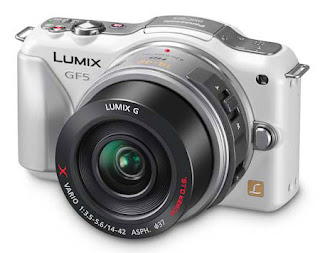
Panasonic Lumix DMC GF5 User Manuals Instruction
Panasonic Lumix DMC-GF5 Digital Micro Four Thirds Camera Users Manual (Owners Instruction) - The LUMIX GF5s Creative Control lets you enjoy giving your intention to make the image even more impressive. Unleash your creativity with many new filter effects – including Soft Focus, Star Filter, Toy Effect and more – letting you apply captivating visual effects to your photos without the need for post-production software. Shoot elegant street scenes with Dynamic Monochrome, and make your photos stand out with One Point Color mode. You can Free Download Panasonic Lumix DMC-GF5 Operating Instruction Guide / Owners Manual / Users Manual (PDF format) below.
 |
| Google Image |
GF5 features a new Scene Guide offering 23 sample pictures shot by professional photographers. Users can choose the photo closest to the situation that they are shooting and optimal parameters for shooting the scene will be set automatically. Additionally, procedures, technical advice and recommended interchangeable lens options for the scene can be shown to allow users to better understand and learn photography.
The Touch AF in video recording also lets the user enjoy professional-like selective focusing which allows the focus to be changed while shooting video. And thanks to full time Auto Focus and Auto Focus Tracking, once youve chosen the subject the camera will automatically track and follow its movement, meaning you can get sharp, clear footage with ease.
Key Features of Panasonic Lumix DMC-GF5:
- High sensitivity 12.1 MP LIVE MOS Sensor
- Venus Engine VII HD2 with Multi-process Noise Reduction
- 3.0-inch / 3:2 Aspec 920k dots high-resolution touch control LCD Screen with Wide-viewing angle
- ISO up to 12800
- 1920 x 1080 Full HD video recording in AVCHD / MP4 format
- 0.09 sec Light Speed AF with Precise Contrast AF
- Burst shoot up to 4fps @ full resolution
- 14 Creative filters
- iA (Intelligent Auto) Plus
- Scene Guide
- 3D Shooting
- Extra Tele Conversion function
- Built-in Flash, GN6.3
Download Panasonic Lumix DMC-GF5 Operating Instruction Guide :
Panasonic Lumix DMC-GF5 English Owners Manual - Basic Operating Instructions, EnglishPanasonic Lumix DMC-GF5 Spanish Owners Manual - Basic Operating Instructions, Spanish
Panasonic Lumix DMC-GF5 English Operating Instruction Manual - Operating Instructions for advanced features, English
Saturday, April 6, 2013
IPOD TOUCH 2G JAILBREAK FIRMWARE 2 2 1 INSTRUCTION
Here you can find the instructions to Jailbreak the iPod Touch 2G. This is not an official way of the iPhone-Dev team, but is probably as in the tools and incorporated QuickPWN pwnagetool.
What is required?
What is required?
- unofficialsn0w 2.0 for Windows: Download
- iPod Touch 2G firmware 2.2.1: Download
- Libusb-library: Download
- C + + Redist: Download
First, the libusb-library and C + + Redist install. Then the unofficialsn0w.zip unpack. must now be the iPod Touch 2G firmware (iPod2, 1_2.2.1_5H11a_Restore.ipsw) in the folder unofficialsn0w ISPW copied or moved. be renamed the end of the preparation, the firmware 2.2.1 (original name: iPod2, 1_2.2.1_5H11a_Restore.ipsw) in OriginalFW.ispw. Does it ensure that you have displayed the file extensions. Should be hidden, then rename only OriginalFW, otherwise the file is OriginalFW.ispw.ispw.
Then executes the file in the folder IPSW.bat officialsn0w. So that the patched firmware is created. It takes time, depending on the computer, 5-30 minutes and should not be stopped.
In the directory unofficialsn0w ISPW now a file called JB.ispw has been created. This JB.ispw must now be opened with Winrar or 7.zip.and the file in the folder LLB.n72ap.RELEASE.img3 Firmware all_flash all_flash.n72ap.production will be deleted.
Then, the file now LLB.n72ap.RELEASE.img3 from the folder unofficialsn0w ISPW will be copied into the archive. To ensure that all preparations are completed.
Firmware Flashing
Now is the time to put the iPod Touch 2G in to DFU mode.
Quick Guide:
- iPod Touch 2G to connect to the PC
- iPod off
- Power Press and hold
- 1 second later, Home, and hold both buttons for exactly 10 seconds
- when the computer reports that a USB device is connected, release both keys
- The display is black, youre in DFU mode, if no, repeat procedure then
Subscribe to:
Posts (Atom)