Tuesday, August 6, 2013
Apple TV Take apart Manual
Apple TV Take-apart Manual. Any portion of this manual may not be copied, reproduced, or distributed without the written consent of Powerbookmedic.com. Violators will be prosecuted. This manual is presented as a guide in order to help you repair problems with your Apple TV. Working on an Apple TV can be dangerous if not done properly. We at Powerbookmedic.com take no responsibility for any damage or harm done to yourself or your Apple TV as a result of reading this guide. Apple manufactures several revisions in each line of their products. This guide will try to cover each of these revisions, but you may find subtle differences between our manual and what you see in your unit. This may require small adjustments to the repair procedure as described in our manual. If you are confused at what you are seeing in comparison to the manual’s description and pictures, you may contact us by phone or email and we will try to assist you. As of the writing of this manual, Apple’s warranty policy denotes that opening up your Apple product will void the warranty. If you are still under coverage by Apple for your Apple TV, we would suggest contacting them first. Repair Center Powerbookmedic.com offers a repair service if you do not feel confident on performing the repair yourself after reading this manual. The repair service is a flat labor charge plus the cost of the parts needed. You can view our labor fees on our website by clicking on the repair center link at the top of the page.
Download: Apple TV Take-apart Manual
Read More..
Download: Apple TV Take-apart Manual

Monday, August 5, 2013
Panasonic Lumix DMC GF5 User Manuals Instruction
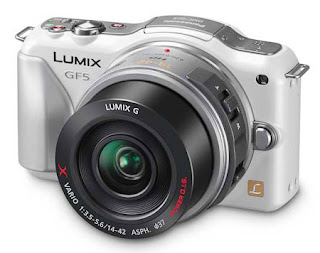
Panasonic Lumix DMC-GF5 Digital Micro Four Thirds Camera Users Manual (Owners Instruction) - The LUMIX GF5s Creative Control lets you enjoy giving your intention to make the image even more impressive. Unleash your creativity with many new filter effects – including Soft Focus, Star Filter, Toy Effect and more – letting you apply captivating visual effects to your photos without the need for post-production software. Shoot elegant street scenes with Dynamic Monochrome, and make your photos stand out with One Point Color mode. You can Free Download Panasonic Lumix DMC-GF5 Operating Instruction Guide / Owners Manual / Users Manual (PDF format) below.
 |
| Google Image |
GF5 features a new Scene Guide offering 23 sample pictures shot by professional photographers. Users can choose the photo closest to the situation that they are shooting and optimal parameters for shooting the scene will be set automatically. Additionally, procedures, technical advice and recommended interchangeable lens options for the scene can be shown to allow users to better understand and learn photography.
The Touch AF in video recording also lets the user enjoy professional-like selective focusing which allows the focus to be changed while shooting video. And thanks to full time Auto Focus and Auto Focus Tracking, once youve chosen the subject the camera will automatically track and follow its movement, meaning you can get sharp, clear footage with ease.
Key Features of Panasonic Lumix DMC-GF5:
- High sensitivity 12.1 MP LIVE MOS Sensor
- Venus Engine VII HD2 with Multi-process Noise Reduction
- 3.0-inch / 3:2 Aspec 920k dots high-resolution touch control LCD Screen with Wide-viewing angle
- ISO up to 12800
- 1920 x 1080 Full HD video recording in AVCHD / MP4 format
- 0.09 sec Light Speed AF with Precise Contrast AF
- Burst shoot up to 4fps @ full resolution
- 14 Creative filters
- iA (Intelligent Auto) Plus
- Scene Guide
- 3D Shooting
- Extra Tele Conversion function
- Built-in Flash, GN6.3
Download Panasonic Lumix DMC-GF5 Operating Instruction Guide :
Panasonic Lumix DMC-GF5 English Owners Manual - Basic Operating Instructions, EnglishPanasonic Lumix DMC-GF5 Spanish Owners Manual - Basic Operating Instructions, Spanish
Panasonic Lumix DMC-GF5 English Operating Instruction Manual - Operating Instructions for advanced features, English
Sunday, August 4, 2013
Nikon D3000 User Manual Pdf ebook
The Nikon D3000 is an entry-level DSLR, but don’t let the term fool
you. When you place the label “Entry Level” on a camera, it might call
to mind a camera with no frills, limited uses, and little more to offer
than an automatic shooting experience. This has been disproved by the
latest crop of cameras released in the past two years, and the D3000
continues to set the bar high for an entry-level camera. This new
generation of point-and-shoots and entry-level DSLRs not only push the
boundary of low-light performance and mega resolutions, they give that
power to a whole new audience of beginning photographers.
Saturday, August 3, 2013
Motorola Defy User Guide
Motorola Defy User Guide contains the information you need when installing, setup, setting, configuring, maintenance and troubleshooting, operating instructions the Motorola Defy.
Table contents of Motorola Defy Manual
Read More..
Table contents of Motorola Defy Manual
- Lets go
- Touchscreen & keys
- Home screen
- Social networking
- Calls
- Contacts
- Messaging
- Text entry
- Web
- Location
- YouTube
- Apps for all
- Bluetooth wireless
- Wi-Fi
- DLNA
- Tips & tricks
- Personalise
- Photos & videos
- Music
- Memory card & file transfer
- Tools
- Management
- Security
- Troubleshooting
- Safety, regulatory & legal
Friday, August 2, 2013
Samsung GT S5220 Tocco Lite 2 User Manual English
Samsung Electronics today annouces its latest touch phone (Samsung tocco Lite 2), the successore to the million selling Samsung tocco Lite 2 will be available in the UK in early March.
Samsung tocco Lite 2 features enchanced social networking services and robust multimedia capabilities with a stylish and sleek design, making it Samsung tocco Lite 2 the perfect choice for anyone that likes to be connected at all times and needs a device to play, Store and share the latest multimedia content, such as photos, videos and games.
See Samsung GT-S5220 Tocco Lite 2 Features more clearly (Samsung GT-S5220 Tocco Lite 2)
Buy Samsung GT-S5520 Tocco Lite 2 now in here (Samsung GT-S5220 Tocco Lite 2)
Learn more Samsung GT-S5220 Tocco Lite 2 with download Samsung GT-S5220 Tocco Lite 2 user manual in below and fun life with your Samsung GT-S5220 Tocco Lite 2
Download Samsung GT-S5220 Tocco Lite 2 User Manual
Read More..
Samsung tocco Lite 2 features enchanced social networking services and robust multimedia capabilities with a stylish and sleek design, making it Samsung tocco Lite 2 the perfect choice for anyone that likes to be connected at all times and needs a device to play, Store and share the latest multimedia content, such as photos, videos and games.
 |
| Samsung Tocco Lite 2 GT-S5220 |
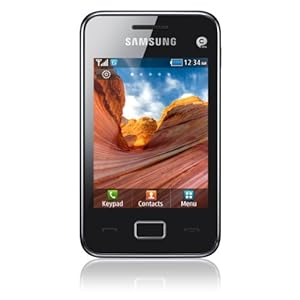
Samsung GT-S5220 Tocco Lite 2 having following specs :
- Design : Full Touch bar Form Factor
- Camera : 3.2 Megapixels
- Memorry : 20 MB
- Bluetooth : 3.0
- Dimension : 58 x 102 x 11.58mm
- Display : 262K Colour TFT technology
See Samsung GT-S5220 Tocco Lite 2 Features more clearly (Samsung GT-S5220 Tocco Lite 2)
Buy Samsung GT-S5520 Tocco Lite 2 now in here (Samsung GT-S5220 Tocco Lite 2)
Learn more Samsung GT-S5220 Tocco Lite 2 with download Samsung GT-S5220 Tocco Lite 2 user manual in below and fun life with your Samsung GT-S5220 Tocco Lite 2
Download Samsung GT-S5220 Tocco Lite 2 User Manual
Hopefully userful to user Samsung GT-S5220 Tocco Lite 2
- download Samsung GT-S5220 Tocco Lite 2 User Manual English (download)
Thursday, August 1, 2013
Apple Remote Desktop Administrator’s Guide Version 3 2
Apple Remote Desktop Administrator’s Guide Version 3.2. The owner or authorized user of a valid copy of Apple Remote Desktop software may reproduce this publication for the purpose of learning to use such software. No part of this publication may be reproduced or transmitted for commercial purposes, such as selling copies of this publication or for providing paid for support services. The Apple logo is a trademark of Apple, Inc., registered in the U.S. and other countries. Use of the “keyboard” Apple logo (Option-Shift-K) for commercial purposes without the prior written consent of Apple may constitute trademark infringement and unfair competition in violation of federal and state laws.Apple Remote Desktop is easy-to-use, powerful, open standards-based, desktop management software for all your networked Macs. IT professionals can remotely control and configure systems, install software, offer interactive online help to end users, and assemble detailed software and hardware reports for an entire Mac network.The Apple Remote Desktop Administrator’s Guide contains chapters to help you use Remote Desktop. It contains overviews and explanations about Apple Remote Desktop’s features and commands. It also explains how to install and configure Apple Remote Desktop on clients, how to administer client computers, and how to use Remote Desktop to interact with computer users. This guide is provided on the Apple Remote Desktop installation disc and on the Apple Remote Desktop support website as a fully searchable, bookmarked PDF file. You can use Apple’s Preview application or Adobe (Acrobat) Reader to browse the contents of this guide as well as search for specific terms, features, or tasks.Remote Desktop Help is available using Help Viewer. To open Remote Desktop Help, choose Help > Remote Desktop Help. The help files contain the same information found in this guide, and are useful when trying to accomplish a task when this guide is unavailable.
Download: Apple Remote Desktop Administrator’s Guide Version 3.2
Read More..
Download: Apple Remote Desktop Administrator’s Guide Version 3.2
Olympus Stylus Tough 8000

Various Gadgets | Olympus Stylus Tough 8000 | The Stylus TOUGH 8000 is Olympuss latest top-end entry into the growing weather- and shock-proof compact camera segment. These cameras are built to endure drops and water exposure that would cripple or kill lesser cameras. The TOUGH 8000 is rated to withstand drops of up to 6.6 feet and to go underwater to depths of 33 feet. Moreover, its freezeproof to 17 degrees Fahrenheit and crushproof to 220 pounds per foot.

Finished entirely in bright and shiny chrome, with visible screws and a very sturdy and dense feel, the TOUGH 8000 has a heft and build quality that live up to its name. The rear LCD is large, if not particularly high-res (at 2.7 inches and 230,000 pixels), and the button layout on the rear makes good ergonomic sense. At the top of the rear of the camera, paired buttons control the zoom setting. Below these, a mode selection wheel allows the user to choose between "regular" shooting, Intelligent Automatic, Beauty, Video, Scene, and Playback modes. A four-way directional pad with buttons that double as function selectors surround a central OK/Function menu button. The directional pads four buttons bring up controls for Exposure Compensation, Flash, Self-Timer, and Macro settings. Along the top edge of the camera there are only two buttons—a small power toggle and the shutter release button.

Operation of the TOUGH 8000 is about as painless as it gets. Both the regular shooting and Intelligent Auto modes are fully automatic, with the regular mode allowing you to adjust a few parameters including ISO, White Balance, and metering mode in addition to the image size and quality.
Subscribe to:
Posts (Atom)